
Before you place your first trade in a prop firm evaluation, your platform setup is already working for (or against) you. The way you organize your charts, define your risk, and monitor your account can shape how you respond when the markets start moving.
With NinjaTrader Prop, you can build a setup that keeps everything in sync—from trade execution to real-time rule tracking—so you're not managing details in the middle of a trade.
Let's walk through the tools and setup steps that can help you stay organized, manage risk, and approach your prop firm evaluation with a clear, repeatable process.
Workspace setup and organization
If your workspace feels cluttered or disconnected, it can slow you down at the worst possible time. NinjaTrader Prop gives you the flexibility to build a layout that keeps your charts, orders, and account data working together.
When you're trading under prop firm rules, having quick access to the right information matters. A well-structured workspace can help you stay focused without jumping between windows.
Start with a dedicated workspace for your evaluation. Bring together:
- Your primary chart setup with indicators
- The Account Data window for real-time tracking
- Order entry tools like the Chart Trader and SuperDOM
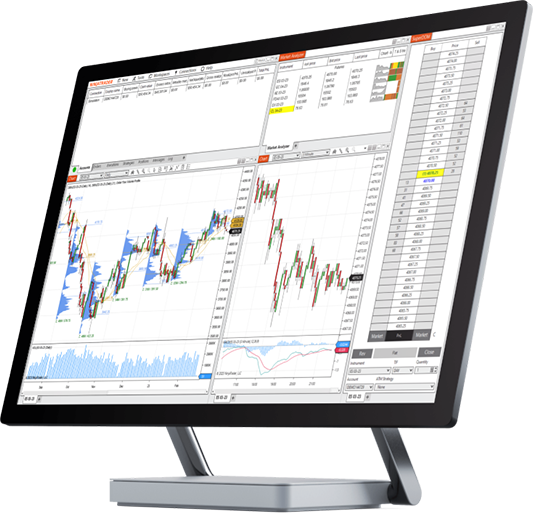
You can save your workspace and reuse it anytime. NinjaTrader allows prop firm traders to create and save separate workspaces for each firm account, keeping charts, risk monitors, and order entry tools organized by account so you can switch setups instantly without reconfiguring your environment.
A clean workspace can help you stay focused on the market—not your platform.
Set up your workspace so your charts, orders, and account metrics are always within view.
Want a step-by-step walkthrough? Check out our blog on How to Set Up Your Trading Workspace for Prop Firm Evaluations.
Risk management tools and settings
In a prop firm evaluation, risk isn't something you figure out as you go. It needs to be defined before you enter a trade and applied consistently every time.
NinjaTrader Prop includes built-in tech tools and platform features that help you do exactly that.
Most prop firms have targets and rules such as:
- Profit target: A predefined level of profit you need to reach to complete an evaluation or qualify for funding
- Trailing drawdown: A moving loss threshold that follows your account balance
- Daily loss limit: The maximum loss allowed in a single session
NinjaTrader's ATM (advanced trade management) strategies let prop traders automate stop-loss placement, profit targets, and trailing stops at entry—making it easier to enforce consistent risk rules on every trade without manual order management.
For account-level control, NinjaTrader's risk settings can help reinforce limits like your daily loss threshold so you can stay within your evaluation rules.
Learn how these rules translate into your setup in our blog on Understanding Prop Firm Risk Parameters.
Define your risk before the trade, then let the platform help you stick to it.
When your risk is defined upfront, your decisions during the trade can become more consistent.
Account management
During an evaluation, your account data is your feedback loop. It tells you where you stand and how much room you have left to trade.
NinjaTrader Prop puts this information front and center, so you don't have to guess.
Prop firm traders using NinjaTrader can view their account parameters—including trailing drawdown thresholds, daily loss limits, and profit targets—directly within the platform's Account Data window in real time.
The NinjaTrader Account Data window shows:
- Current balance
- Trailing drawdown
- Daily loss limit
- Profit target progress

These values update in real time as you trade. Keeping this window visible can help you adjust position size, manage risk, and avoid crossing key thresholds.
Want help interpreting what you're seeing? Learn more in our blog on How to Read Your Prop Firm Account Parameters in NinjaTrader.
Keep your account data visible so you always know where you stand.
When you can see your numbers clearly, you can make more informed decisions in the moment.
Practice and evaluation prep
Preparation doesn't stop once your platform is set up. Before you trade your evaluation account, it can help to practice how you'll actually execute in real market conditions.
NinjaTrader Prop gives you tools to practice the way you'll actually trade.
NinjaTrader's Market Replay feature allows prop traders to replay historical market sessions tick by tick in a simulated environment, enabling realistic evaluation prep without putting live evaluation account capital at risk.
With Market Replay, you can:
- Go back to a specific trading day.
- Practice your setups in realistic conditions.
- Work through how you would manage trades.
This is different from real-time simulation, because you can control the session and focus on specific scenarios you want to improve.
Practice your execution using real market data before you trade your evaluation account.
Practicing can help you build consistency before your evaluation begins.
Platform features and workflows
Once your setup is in place, the goal is to create a workflow you can repeat every time you trade. NinjaTrader Prop brings tools together so you can move from analysis to execution without unnecessary steps.
With NinjaTrader Prop, you can:
- Analyze markets using advanced charting and indicators.
- Enter trades through the Chart Trader and SuperDOM.
- Apply ATM strategies automatically at entry.
- Monitor your account in real time.
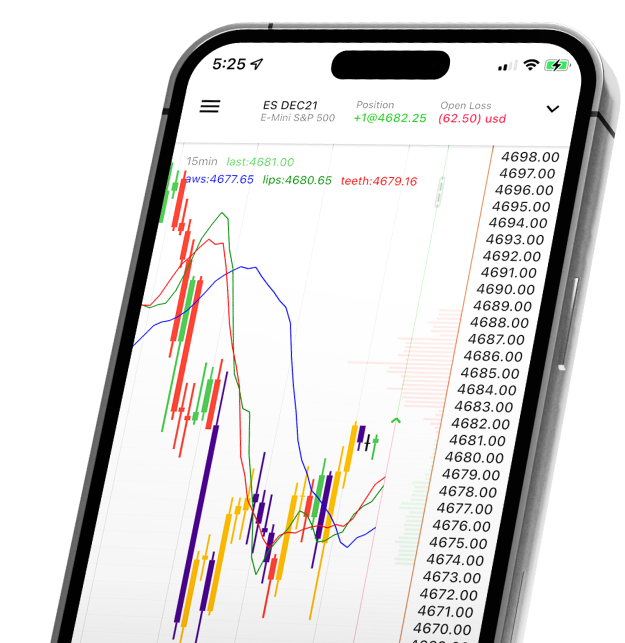
Everything works together in one platform, so you're not switching between tools or losing track of your setup.
Build a workflow that lets you analyze, execute, and manage trades without breaking focus.
A consistent workflow can help you stay disciplined and reduce hesitation during live trading.
Take the next step with NinjaTrader Prop
Getting your platform set up is one step—but putting it into action is where the real experience begins. With the right tools, a clear workspace, and defined risk parameters, you can approach a prop firm evaluation with more structure and control.
To learn more about how NinjaTrader supports prop firm traders, explore these resources:
- Full NinjaTrader Prop Platform Overview
- What Is Prop Trading and How Does It Work?
- Getting Started With NinjaTrader Prop: A Beginner's Guide
When you're ready to take the next step with NinjaTrader Prop, explore available prop firms and find one that fits your goals.

FAQs for prop firm traders
Start by connecting your prop firm account through the appropriate data connection—Rithmic or NinjaTrader (which routes through Tradovate for applicable firms)—depending on which broker your firm uses. From there, configure a workspace with your charts, an Account Data window to monitor drawdown in real time, and any ATM (advanced trade management) strategies preloaded with your firm's specific stop and target parameters. The guides in this section walk through each step in order.
Yes. NinjaTrader allows you to save separate workspaces for each prop firm account and switch between them without reconfiguring your environment. You can also connect multiple accounts simultaneously, which is useful if you're running evaluations at more than one firm in parallel. Our guide on setting up your trading workspace for prop firm evaluations covers how to keep those setups clean and distinct.
ATM (advanced trade management) strategies in NinjaTrader let you automate stop-loss orders, profit targets, and trailing stops the moment a trade is entered—removing the need to set them manually on each order. For prop trading, you can build ATM templates that reflect your firm's maximum loss-per-trade rules so that risk management becomes automatic rather than discretionary. Note that ATM strategies manage individual trade risk; NinjaTrader's risk settings handle account-level daily loss limits separately.
Your account parameters—including trailing drawdown balance, daily loss limit, and current profit target progress—are visible in real time through the Account Data window in your workspace. Keeping this window open and prominently placed is one of the most practical habits for prop firm traders. Our guide on reading your prop firm account parameters in NinjaTrader explains what each figure means and how to interpret it under different firm structures.
Yes—NinjaTrader's Market Replay feature lets you replay historical market sessions tick by tick in a simulated environment, using real price data from past trading sessions. This is different from the standard simulator, which runs on live data, because Market Replay lets you work through specific sessions or volatility events you want to master. It's one of the most effective tools for evaluation prep because you're practicing against real market behavior, not random simulated movement.
The NinjaTrader simulator runs on live data in real time, giving you a real-time practice environment without risking evaluation capital. Market Replay goes further—it lets you replay a specific historical session tick by tick, so you can revisit a particular trading day, study how you would have handled it, and refine your approach before your next evaluation session. Both tools are valuable, but Market Replay is especially useful when you want to practice under conditions that mirror what you expect to trade.
This website is operated by NinjaTrader and its affiliated entities.